
PluginOutlook
TikiOutNotes
Turn every Outlook Classic appointment into notes, decisions, and next steps.
Gallery
1 / 2
Overview
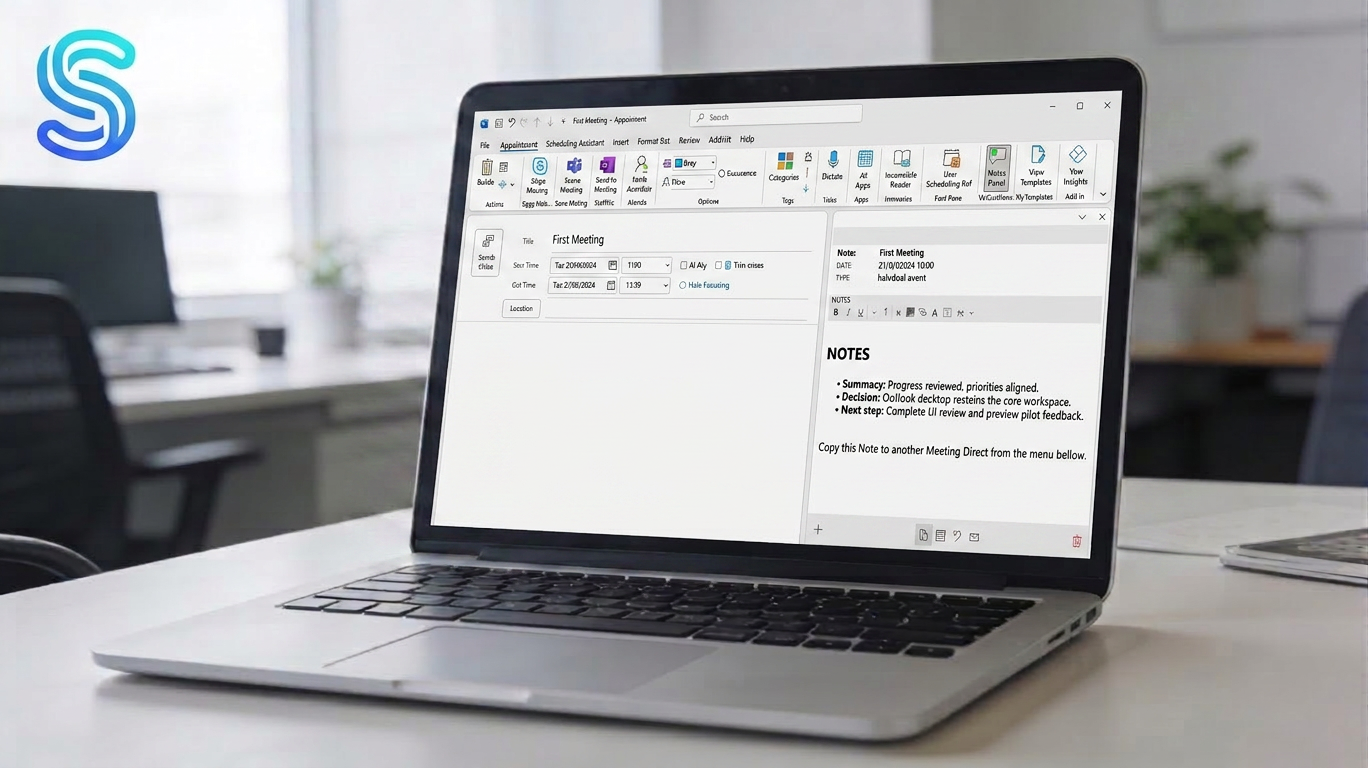
TikiOutNotes brings your meeting notes right into Outlook Classic desktop — structured notes, decisions, and next steps, all linked to the appointment, without leaving Outlook.
Benefits
• Native Outlook Desktop integration: instant access while you review or edit the appointment.
• Notes per meeting: everything stays tied to its appointment (context and traceability).
• Better follow-through: agreements and action items stay clear and retrievable in seconds.
Privacy and security
• Your notes are stored locally on your machine, encrypted at rest with the Windows Data Protection API (DPAPI).
• No cloud and no telemetry: your content never leaves your machine and is never sent to Softiki.
• Digitally signed installer (Authenticode) and updates verified by signature and hash.
• Built following secure-coding practices based on OWASP guidelines.
Support and updates
• Direct support from the developer, plus continuous updates and improvements.
Features
- ✓Notes per meeting/appointment: create and review notes tied to each Outlook appointment.
- ✓Built-in note editor: a panel inside Outlook to write during the meeting.
- ✓Decisions and agreements log: capture what was decided and what was agreed.
- ✓Actions / next steps: jot down follow-up tasks coming out of the meeting.
- ✓Access from the calendar: open notes directly from the appointment.
- ✓Local, encrypted storage (Windows DPAPI): your notes never leave your machine.
- ✓No cloud, no telemetry: works fully offline.
- ✓Signed installer and verified updates (signature + SHA-256 hash).
- ✓Enterprise-ready: deploy via MSI and Group Policy (GPO/Intune).
- ✓14-day Pro trial, no credit card required.
Pricing
Current prices and conditions (plans, trial, renewal, and license) are shown on the product's official checkout.
Pro Monthly
$4.99/mo
Full features for individuals. Cancel anytime.
Pro Annual
$35.88/yr
Same Pro features, 2 months free vs monthly.
Pro Lifetime
$89once
One-time payment, all future updates included.
Business 5 Seats - Monthly
$25/mo
One key, 5 concurrent devices. Deploy via MSI + GPO.
Business 5 Seats - Annual
$215/yr
One key, 5 concurrent devices. Best value for small teams.
Business 10 Seats - Monthly
$52/mo
One key, 10 concurrent devices. Deploy via MSI + GPO.
Business 10 Seats - Annual
$410/yr
One key, 10 concurrent devices. Best value for growing teams.
Continue to purchase
Business 50+ Seats
50, 100, 300, 500 or 1000 seats. Contact us for a quote and a purchase order.
FAQ
What is TikiOutNotes?+
TikiOutNotes is a native add-in for Outlook Classic on Windows that lets you take notes, record decisions, and track next steps — all linked to your meetings and calendar events.
Which version of Outlook does it support?+
TikiOutNotes is designed for Outlook Classic (desktop) on Windows. It works as a native COM add-in that integrates directly into your calendar and appointment views.
Do I need to leave Outlook to use it?+
No. TikiOutNotes works entirely inside Outlook Classic. You can open, write, and save your meeting notes without switching to any other app.
Are my notes linked to each meeting?+
Yes. Each note is linked to its corresponding Outlook appointment, so you always have full context when reviewing past or upcoming meetings.
What can I save in a note?+
You can capture meeting context, decisions made, agreements reached, and follow-up tasks or next steps — all organized and easy to retrieve later.
Is it suitable for corporate environments?+
Yes. TikiOutNotes is built for organizations where Outlook is the center of daily work. It requires no cloud sync or external services — everything stays within your environment.
Is there a free version available?+
Yes. TikiOutNotes offers a Free plan so you can try the core features before upgrading to Pro for the full experience.
What support do I get?+
Every paid plan includes direct support from the developer by email (info@softiki.com), plus ongoing updates and improvements — no ticket queue, no bots.
How do I get started?+
Download and install TikiOutNotes, then open Outlook Classic. The add-in will appear in your ribbon. Open any appointment to start taking notes right away.
Where are my notes stored? Is it secure?+
Your notes are stored locally on your own computer, inside your Windows/Outlook profile, and encrypted at rest using the Windows Data Protection API (DPAPI). They are not uploaded to the cloud and are never sent to Softiki.
Can Softiki see my notes?+
No. The content you write stays on your machine. Softiki has no access to your notes or to any personal data you enter in them. For payments and license validation we use Paddle, our merchant of record.
Does it work offline?+
Yes. TikiOutNotes works fully offline. It does not need a cloud connection to create, edit, or save your notes.
How are updates and security handled?+
The installer is digitally signed (Authenticode) and updates are verified by digital signature and SHA-256 hash before being applied. The product is developed following secure-coding practices based on OWASP guidelines.
What happens when the trial ends or my license expires?+
When the 14-day Pro trial ends, Pro features become unavailable unless you purchase a license, but the notes you already created remain on your computer. The free plan keeps working.
Is it GDPR-friendly?+
Because your notes are stored locally and Softiki never accesses or processes them, you stay in control of your data. You act as the data controller for any personal data you record about third parties and should have a proper legal basis. See our Privacy Policy and Terms of Service for details.
Is it compatible with the new Outlook, Outlook on the web, or Mac?+
No. TikiOutNotes is a native COM add-in for Outlook Classic (desktop) on Windows. It does not run on the new Outlook, Outlook on the web, or Outlook for Mac.
Can IT deploy it across an organization?+
Yes. TikiOutNotes can be deployed per machine with an MSI installer and managed centrally through Group Policy or Intune (ADMX policies), with no cloud dependency.
Do you offer refunds?+
Refund requests are handled through Paddle, our merchant of record, within 14 days of purchase according to the refund policy in effect. If you are an EU consumer, statutory withdrawal rights for digital content may also apply. See our Terms of Service.